Organizing a company’s event involving 200-person does not just involve finding a place where everyone will be seated. But what happens if some people sitting behind can’t hear the key-note speaker or the presentations made are not clear, or the presenter does not have the capability of projecting his computer screen?
These problems will quickly turn into obstacles that will disrupt the organization of your great event.
Choosing the proper 200-person corporate conference equipment will depend on various factors: the venue, room configuration, program of the conference, number of speakers, the format of the presentations, whether you want to film or broadcast your event live.
In this article, you will learn about 10 pieces of equipment that will be necessary for organizing a 200-person corporate conference and some aspects to consider before renting equipment for your event.
What Equipment Does a 200-Person Corporate Conference Need?
There may be the possibility that an event comprising 200 participants will require the application of various types of audio, visual, staging, lighting, and technical equipment.
The basic equipment required for such an event would typically include an audio system, microphones, projection screen or LED screen, presentation equipment, stage and podium, event lighting, power and connectivity equipment, and technical support.
For events having breakout sessions, recording services, or remote attendees, there could be other equipment required.
The attendance at an event should not be the only determining factor for selecting the equipment. A conference having 200-person in one room could have different equipment requirements than one which is spread over several rooms..
1. Professional Sound System
Effective audio equipment forms an integral part of the corporate conference. Each participant must hear the presentations clearly without being exposed to high sound levels, unnecessary feedback, or insufficient sound.
The configuration of your audio equipment may include primary PA speakers, amplifiers if necessary and a mixing desk for regulating various audio inputs.
While placing your speakers, the shape and size of the venue need to be considered. The selection of the audio equipment according to the number of participants can lead to inadequate sound dispersion.
With a mixing desk, you will have control over the use of microphones, audio presentations, videos, and other sources of sounds during the event. It will also be beneficial for stage monitors, especially if the presenters need to listen to sound or get stage directions.
It is important that before the event, the whole audio equipment be tested at the conference venue.
2. Wireless and Presentation Microphones
Your microphone needs will vary according to the number of speakers, presenters, panelists, and audience participation you plan for your conference.
A lavalier microphone is suitable for keynote speakers since they have to move while speaking. Handheld microphones will be useful for moderators and panel discussions.
A podium microphone may be suitable if the speaker is presenting from a lectern.
You will also want to have extra batteries and a backup microphone, especially if you have a lot of speakers on your agenda.
Testing wireless microphones before the guests arrive will be necessary in case there is any interference or problems with the microphone level. Your aim here is very clear – everyone must speak clearly without needing to keep making changes to the equipment.
3. Large Display, Projector or LED Screen
It is important that a conference display makes presentations, videos, graphs, and other visual material comprehensible for all attendees.
In relation to the location of the conference and other production needs, you may use a projector and screen or an LED display.
While a projector may be a good option for your conference if there is proper lighting in the conference room and viewing conditions, an LED display could come handy if a bright and high-resolution display is required despite the varying lighting conditions.
This choice is not determined only by the number of attendees. It is also important to take into account the dimensions of the room, viewing distance, lighting and the type of the material being displayed.
It is important to have good sightlines. If the participants at the back cannot read the slides of your presentation, then your good presentation will become useless.
4. Presentation and Video Equipment
A good presentation requires not only a projector screen but also dependable equipment for connecting presenters’ material to the main screen.
Some examples of useful equipment include a presentation laptop, presentation clicker, HDMI and USB-C adapters, suitable cables, and if needed, a video switcher.
A confidence monitor can be useful as well in letting presenters know what is being presented without looking at the audience.
It makes sense to be prepared for diverse laptop connections, as some speakers might come with other laptops. Having compatible adapters can avoid some unnecessary waiting time.
Another useful thing is to have copies of presentations and even a backup laptop. It makes sense to check presentations, videos, fonts, animations, and audio before the conference starts.
5. Stage, Lectern and Conference Furniture
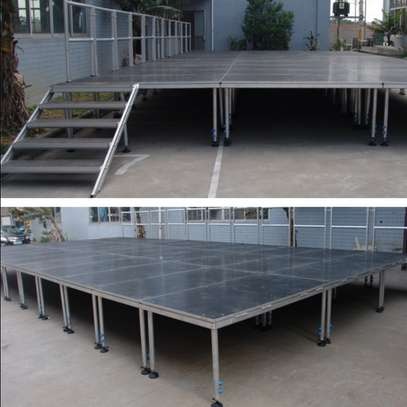
Stage or Riser will provide focus to the area where the presentation will take place, and this can be helpful in increasing the visibility of speakers.
The stage configuration according to the type of programme you are holding may consist of a lectern, stage steps, panel chairs, panel table, confidence monitor, and branded backdrop.
It is essential that there is adequate room for the presenters to move around without being hindered by other production equipment like microphones and lighting.
For the panel discussion, the placement of furniture should be such that it makes sure that all the participants can be seen and heard.
The final stage configuration will depend upon your programme rather than going for a standardized stage size.
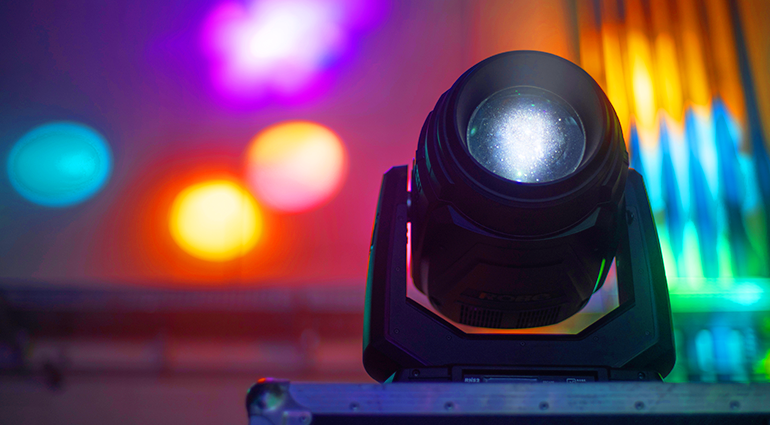
6. Professional Stage and Event Lighting
The lighting will have a practical function for the company’s conference.
It is essential that the speakers are seen clearly, while the attendees can watch the presentation screen without issues.
The stage wash lighting will enable even lighting of the presentation area, while further lighting might be used for the lectern or part of the stage.
Branded or accent lighting might help with the visual aspect of the conference.
Nonetheless, you need to ensure that lighting works together with your screens and cameras.
If you have too much light focused on the screen, the picture may become invisible, and the lack of proper lighting of the speakers can be an issue if you are recording the conference.
Therefore, a good lighting setup must consider the above-mentioned aspects.
7. Cameras, Recording and Hybrid Conference Equipment
Cameras and livestreaming equipment do not have to be a necessity for all 200-person conferences. These tools will be needed if remote participation and event recording or streaming online are included in your conference programme.
Based on your needs, you might need presentation cameras, video cameras, tripods, equipment for recording, and an appropriate production system.
Livestreams will require reliable access to the internet and equipment able to transmit both video and audio to the chosen platform online.
The audio feed is especially important in such a case. The remote participants will need good-quality speech, not just the camera shots from the room.
If you decide to either record or stream your conference online, then these needs have to be taken into account in advance, not right before the start of the programme.
8. Power, Cables and Connectivity Equipment
Power and connectivity issues are often disregarded during the planning of conference equipment because they help out all other elements of this setup.
Depending on the location and equipment, you will need to get extension cables, power management systems, surge protectors, cable covers, HDMI cables, USB-C hubs and chargers.
You will need to get information about the availability of power sockets in this venue and if your equipment can be used there.
Cables need to be placed in safe spots so as not to make extra hazards in walking zones.
When presenters need to have Internet connection for demonstration purposes or using any kind of online platform for making presentations, connectivity issues need to be checked before the conference starts.
9. Breakout Room and Audience Equipment
A company event of 200-person might not be conducted in one room alone. In case the participants would have to break into different groups in order to conduct workshops and other such sessions, each of these rooms may also need separate equipment.
The need for the equipment will depend upon the nature of the activity in each of the rooms.
If there is a session which involves discussion, then the need for equipment might be less than a presentation which has videos and audio as well as participation from the audience.
It is advisable to plan these needs beforehand, since the breakout sessions might have to be as well-equipped as the conference itself.
10. Backup Equipment and Technical Support
Even tested equipment can have unexpected problems. Proper backup will be useful in minimizing the impact of such events.
Proper backup materials could include extra microphones, batteries, cables, adapters, backup laptop for the presentation and backup connectors.
Technical support is also important. You may require a sound technician, lighting technician, video technician, camera operator or event technician based on the conference programme.
The task of these technicians is to monitor all equipment throughout the programme and make any necessary adjustments.
The aim is not just having equipment in place at the venue. The aim is to have the equipment properly installed, tested and operated during the entire conference.
How to Choose the Right Conference Equipment Package
Step one is to evaluate the venue. This includes determining the dimensions of the room and ceiling height, power availability, audio visual equipment and lighting.
Consider the conference schedule. How many speakers do you have? Panel discussion or audience Q&A? Are there any breakout sessions? Will the session be recorded or streamed online?
Such considerations will allow you to figure out what equipment you really need and avoid wasting money on useless equipment for your programme.
Another useful thing would be a technical rehearsal. You should test microphones, presentations, screens, lighting, videos and other equipment before people arrive. It gives the technical crew a chance to detect possible mistakes and correct them.
200-Person Corporate Conference Equipment Checklist
Audio
- PA speakers
- Mixing console
- Wireless microphones
- Stage monitors
Visuals
- LED screen or projector
- Presentation laptop
- Presentation clicker
- Confidence monitor
Production
- Stage
- Lectern
- Event lighting
- Cables and power equipment
Optional equipment
- Cameras
- Recording equipment
- Livestreaming equipment
- Breakout-room AV equipment
Call to Action
When equipping your conference for 200-person, it is not just about getting a big sound system or screen. The specific equipment that will be needed will depend on many things including the venue, program, speakers, and how participants interact and are expected to participate in the production process.
By doing all this preparation in advance and making sure the right tests are done and having the right backup, you will be able to set up an environment in which the presenters are able to communicate and the participants are able to understand the program.
For corporate conferences in Nairobi, Lumievents.co.ke can help you get the right equipment for your venue, program and participants.